
How to export Google Maps Timeline on Android and iPhone
Google moved Timeline onto your phone in 2024–2025, so there's no Timeline website to download from anymore. The export now comes from your phone. On Android it is in Settings, not in the Google Maps app.
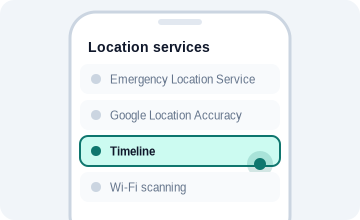
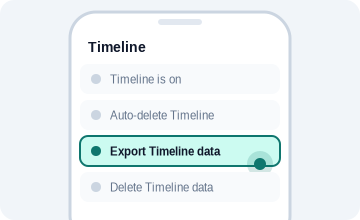
Android: Settings → Location → Location services → Timeline → Export Timeline data. It is not in the Google Maps app on Android.
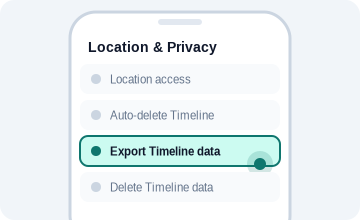
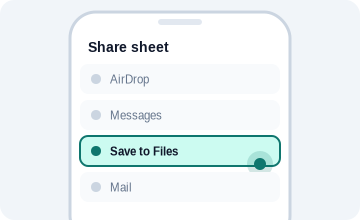
iPhone: Google Maps app → profile picture → Settings → Location & Privacy → Export Timeline data → Save to Files.
Android
- Open your phone's Settings app (not Google Maps).
- Tap Location, then Location services, then Timeline.
- Under Timeline, tap Export Timeline data, then Continue.
- Pick where to save the file (Downloads is fine) and tap Save. A popup says "Export complete."
The file is named Timeline.json. Phone makers word menus slightly differently, so if you don't see an item, search Settings for "Timeline".
iPhone and iPad
- Open the Google Maps app and tap your profile picture (top right).
- Tap Settings, then Location & Privacy.
- Tap Export Timeline data.
- On the iOS share sheet, tap Save to Files, choose a location, and tap Save at the top right.
The file is named location-history.json.
If you don't see "Export Timeline data"
- Android: you may be looking in the wrong app. Go to your phone's Settings → Location → Location services → Timeline.
- Timeline may be off. It's off unless you turned it on, and there's nothing to export until it has been saving trips. In Google Maps, tap your profile picture → Your Timeline → the menu → Location & privacy settings, and check that it says "Timeline is on." Turning it on records trips from then on, not past ones.
- Update Google Maps. Google says Timeline is available in Google Maps version 11.106 and up on Android and 6.93 and up on iPhone. It isn't available on Android Go devices.
- New phone? An export only has what's stored on that device. If you backed up Timeline, open Your Timeline, tap the cloud icon, choose the backup and import it, then export.
- Auto-delete. Timeline can delete data older than 3, 18 or 36 months, and deleted data can't be recovered. Change it before you depend on it for a full tax year.
What's in the file
The Android file is one JSON object with semanticSegments (trips and visits), rawSignals and userLocationProfile. The iPhone file is a JSON array of segments with coordinates written as geo: text and numbers stored as strings. The two shapes differ, which is why some tools fail on one of them. RecapMiles reads both, plus older Google Takeout "Semantic Location History" files, all on your device. Google doesn't publish these formats, so they can change.
Next step
Drop the file into RecapMiles. It's processed in your browser and never uploaded. Then read how to turn Timeline into a mileage log.
Quick answers
Where is Export Timeline data on Android?
It is in your phone's Settings app, not inside Google Maps: Settings > Location > Location services > Timeline > Export Timeline data. Then tap Continue, choose where to save, and tap Save.
Where is Export Timeline data on iPhone?
In the Google Maps app: tap your profile picture > Settings > Location & Privacy > Export Timeline data, then Save to Files. The file is named location-history.json.
Why can't I find Export Timeline data?
Timeline may be off, Google Maps may be out of date (Google lists Maps 11.106 or newer on Android and 6.93 or newer on iPhone), or you may be on an Android Go phone, where Timeline isn't available. On Android, make sure you are looking in Settings, not in Google Maps.
Turn your Timeline into a mileage log
RecapMiles reads your Google Maps Timeline export on your device, totals the miles, and estimates your deduction at IRS rates. Your file is never uploaded.